
Multiplayer SDKs & Patterns
Understanding Multiplayer - Part II
In the first post, we looked at what makes up multiplayer applications, what basic understanding is required, and what common misconceptions exist. In this post, we explore the question of what infrastructure and SDKs are needed for multi-user applications, and what specifically needs to change in the source code to extend an existing application with multiplayer functionality.
Infrastructure
Since in this case we're only talking about network multiplayer, we can assume that there is always at least one server and two clients in order to experience an application in multiplayer.
First, let's go into which components a topology can be made up of. The topology defines what counts as a server and what counts as a client — and as we'll see, there are also cases where both are the same thing.
-
Transport Layer. Describes the protocols and tools used to send and synchronize data.
-
Client Runtime Application. The runtime used by clients.
-
Server Runtime Application. The runtime used by the server.
Backend Services. Standalone services for matchmaking, leaderboards, friend lists, etc.
Player-Hosted P2P
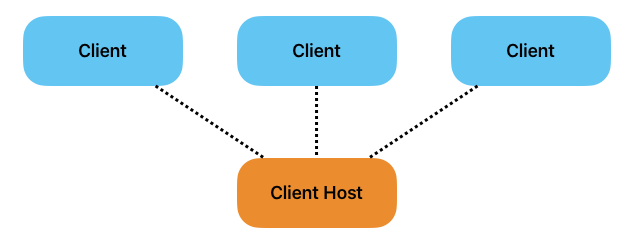
In a peer-to-peer network, there's no server in the classic sense. Instead, one of the clients simultaneously acts as a server — a so-called host — that other clients connect to.
-
Cost-effective. Without the need for a classic server that would have to be dedicated and hosted, the cost of multiplayer drops to a minimum.
-
Relay Server. If multiplayer should be possible over the internet rather than just a local network, a relay server would be needed to initiate and manage the connection between both peers. Otherwise, users would need to open specific ports on their routers, which can be very impractical depending on the target audience and use case.
-
Host authority. In applications and games with a competitive nature, the host has a significant advantage over connected clients, since they don't have to deal with any latency — client and server run on the same device. It also can't be prevented that the host manipulates the game state in their favor, which is a serious problem for applications where data integrity is a priority.
-
Host migration. If the host leaves the game, that also means a connection loss for all other clients. A countermeasure is host migration, which promotes another client to host and transfers the entire state, including authority, to them. Depending on the use case, this can be a complex and error-prone process that in any case interrupts the user experience.
Host performance. The device acting as host bears an increased load, since it has to process the client runtime in addition to the server runtime. On devices with limited performance, this can cause problems.
Direct P2P
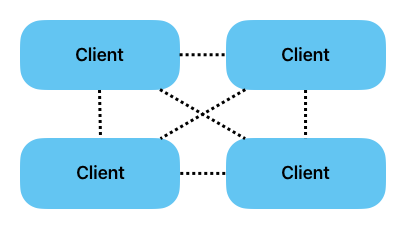
In a direct peer-to-peer network, clients connect directly to each other and each also acts as a server. In addition to the pros and cons of a player-hosted solution, there are further points that make direct P2P a solution that's best avoided.
-
Complex synchronization. If every client is also simultaneously a server, the question arises of who has authority over the objects to be synchronized. In this case, a special consensus mechanism is needed that determines and accepts a valid game state from the many inputs. Such mechanisms, however, are complex and error-prone and should be avoided where possible.
-
Poor scaling. In a direct P2P network, all clients are connected to all other clients. With every new client, the number of connections increases significantly.

If n corresponds to the number of clients, an application with 4 clients has 6 connections, an application with 8 clients already has 28 connections, and with 12 clients it's 66 connections.
Direct P2P was only mentioned in this post for the sake of completeness. The details should show that established multiplayer SDKs deliberately don't support this solution.
Dedicated Server
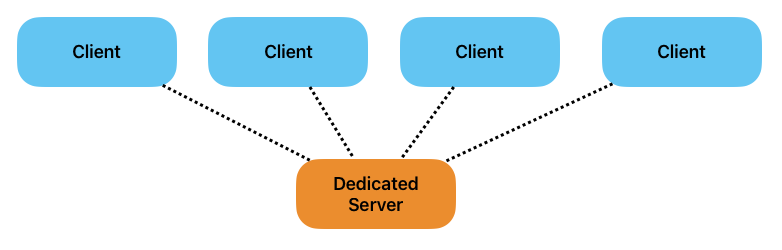
Probably the most common solution for a robust multiplayer setup. Here, the server runtime is hosted on a dedicated server, which individual clients connect to.
-
Fair. Unlike P2P networks, none of the clients have an advantage when higher latency occurs. All clients receive state changes simultaneously, assuming they all have a similarly strong internet connection.
-
Secure. Without a host, no client has the ability to access all server-authoritative objects, which makes cheating substantially harder.
-
Scalable. Every new connection only creates one more connection between server and client. It doesn't matter to clients how many other clients are connected. Only the server needs to send data to an additional client on a state change.
-
Availability. Without the need for a host, developers have full control over the quality of the multiplayer experience. They can decide for themselves how much processing power the server hardware should have. Especially for target audiences with weaker hardware, a dedicated server can take a lot of the load off the user side.
Software Development Kits
State management is complex, and it's an especially important topic for real-time applications like XR applications and video games. The diverse and often very unique requirements call for comprehensive tools that make it easier for developers to work on multiplayer. These tools, or the codebase for multiplayer functionality, are often referred to as netcode.
Integration
This section isn't about specific SDKs, but about the basic functions you should expect from SDKs. If these aren't provided, you should be aware of the effort required to implement these functions yourself.
-
Game Engine. If a game engine is used for development, Unity and Unreal, for example, offer their own SDKs for developing multiplayer features. From a software perspective, a game engine can be seen as its own massive framework with a GUI that follows its own design philosophy for how video games should be developed. An in-house SDK is then nothing more than a plugin for these frameworks, and it's especially attractive when the project closely follows the engine's design philosophy.
-
Third-party. Beyond that, there are also more abstract SDKs that are agnostic to game engines or frameworks. That flexibility, however, comes at the cost of development time needed to build interfaces between the SDK and the game engine. If you use, for example, a Rigidbody component in Unity, for which a ready-made network solution exists in the official Unity SDK, developers would have to write their own netcode for it in this case.
-
Whichever path you choose, all SDKs provide tools to support various hosting/topology variants and to communicate state over the network to clients. In the next section, we'll go into these tools.
Transport Layer
Multiplayer SDKs offer a wide range of tools for development and take a lot of work off developers' hands in many respects — starting with the transport layer. A transport layer establishes the connection between the applications and the hosts in a network and ensures reliable data exchange.
An SDK's transport layer can include the following functions:
-
Connection-oriented communication guarantees a robust connection via a handshake protocol.
-
Data integrity is restored via retransmission in the case of corrupted or lost packets.
-
In the event of lost packets, high network latency, and/or hardware failure, packet order can be restored.
-
Traffic is regulated so as not to unnecessarily strain network performance.
Tooling
The transport layer is used by a variety of modules and functions that want to send the game state to other clients or the server. There are a number of ways to communicate state, which can be traced back to the different types of synchronization covered in an earlier section.
Here are the two most important tools that every multiplayer SDK should implement:
Network Variables
Continuous synchronization, like a ball in a soccer simulation, needs to be synchronized with all clients as quickly and reliably as possible. That's why SDKs typically offer a variable type that allows variables to be synchronized over the network. Depending on the implementation, these are then synchronized on every change and/or at a certain frequency. Here too, it needs to be defined who has authority over the variable. In Unity's in-house SDK called Netcode for GameObjects, such a variable would be used as follows.
The class that wants to use the network variable must inherit from NetworkBehaviour. The NetworkBehaviour class inherits from the well-known MonoBehaviour class and extends it with network functionality, with methods like bool IsOwner() or int GetNetworkObjectId(), and also callback functions like OnNetworkSpawn() to react to network events.
You can then use the NetworkVariable class to declare a network variable.
NetworkVariable<int> m_SomeValue = new NetworkVariable<int>();
The value of the variable, however, is changed using its own attribute.
m_SomeValue.Value = k_InitialValue;To be notified about changes to the variable, you use the callback function provided for that purpose.
m_SomeValue.OnValueChanged += OnSomeValueChanged;If a client tries to change the variable but doesn't have authority over it, this function call fails. Check out the documentation for more information about the NetworkVariable class.
Remote Procedure Calls (RPCs)
For event-based synchronization, RPCs are especially useful. They provide the ability to execute functions on the server and/or clients. RPCs also make it clear why it's important for the server and client runtime to use the same codebase. For an RPC to find the right instance in the application to make a function call on, that instance must have the same logical path as the application that sent the RPC.
In the case of Netcode for GameObjects, you create an RPC as follows.
Say we have a particle system that should be started on all clients at the same time. In this case, the ClientRpc annotation exists.
[ClientRpc]
public void PlayParticlesClientRpc() {
  ParticleSystem.Play();
}
This function, however, could only be executed by the server or the host, since Netcode for GameObjects doesn't allow clients to call a ClientRpc. But if we want to trigger the effect from a client, we need to take the detour through a ServerRpc, which then executes the ClientRpc.
[ServerRpc]
public void PlayParticlesServerRpc() {
  PlayParticlesClientRpc();
}
In this case, a client would execute the ServerRpc. The server receives the RPC and then executes it on all clients, including the one that sent the original RPC. This might seem cumbersome at first. But besides the advantage that authority over the function call stays with the server, it also means the function is executed on all clients at the same time. With high and/or varying client latency, this can still lead to differing experiences.
Specific Solutions
Besides the solutions just mentioned, there are also plenty of solutions tailored to specific game engines. Not every game engine has its own multiplayer SDK, but there are usually at least interfaces available.
SDKs also provide different solutions for very specific problems that don't necessarily come up in every project. A well-known example is dead reckoning.
Dead reckoning is a technique in multiplayer game development used to predict and interpolate the position and movement of objects in order to ensure a smooth and lag-free presentation. Since latency occurs frequently, the server doesn't constantly send the exact position of all objects to all clients. Instead, clients calculate positions based on the last received data and the expected movement. When new data arrives, they adjust the predictions to minimize discrepancies and ensure as smooth a presentation as possible. This improves the user experience by reducing lag and improving synchronization between clients.
Every Application Is Unique
In this post, we looked in detail at the tools available to developers when they want to build a multi-user application. But this was only a small glimpse meant to build a basic understanding. Beyond the options mentioned, there are many more that are so specific to their use cases that it makes little sense to mention them here without causing confusion. The important thing to understand is that not all of these tools need to or should be used. Every application is unique and should be treated accordingly. Choosing the right tools requires a deep understanding of the application's structure and should always be chosen carefully to avoid having to rebuild things later.
In the next article, we'll take a closer look at the real options developers have for starting development on a multi-user feature. We'll also introduce a set of questions to make it easier to make decisions regarding infrastructure and software.